
Fields built for qualification
In addition to the required name and WhatsApp fields, add text, email, or selection fields to collect the context you need.
Publish a form on your website, send a welcome message as soon as a lead submits it, and schedule optional WhatsApp follow-ups.
See how it works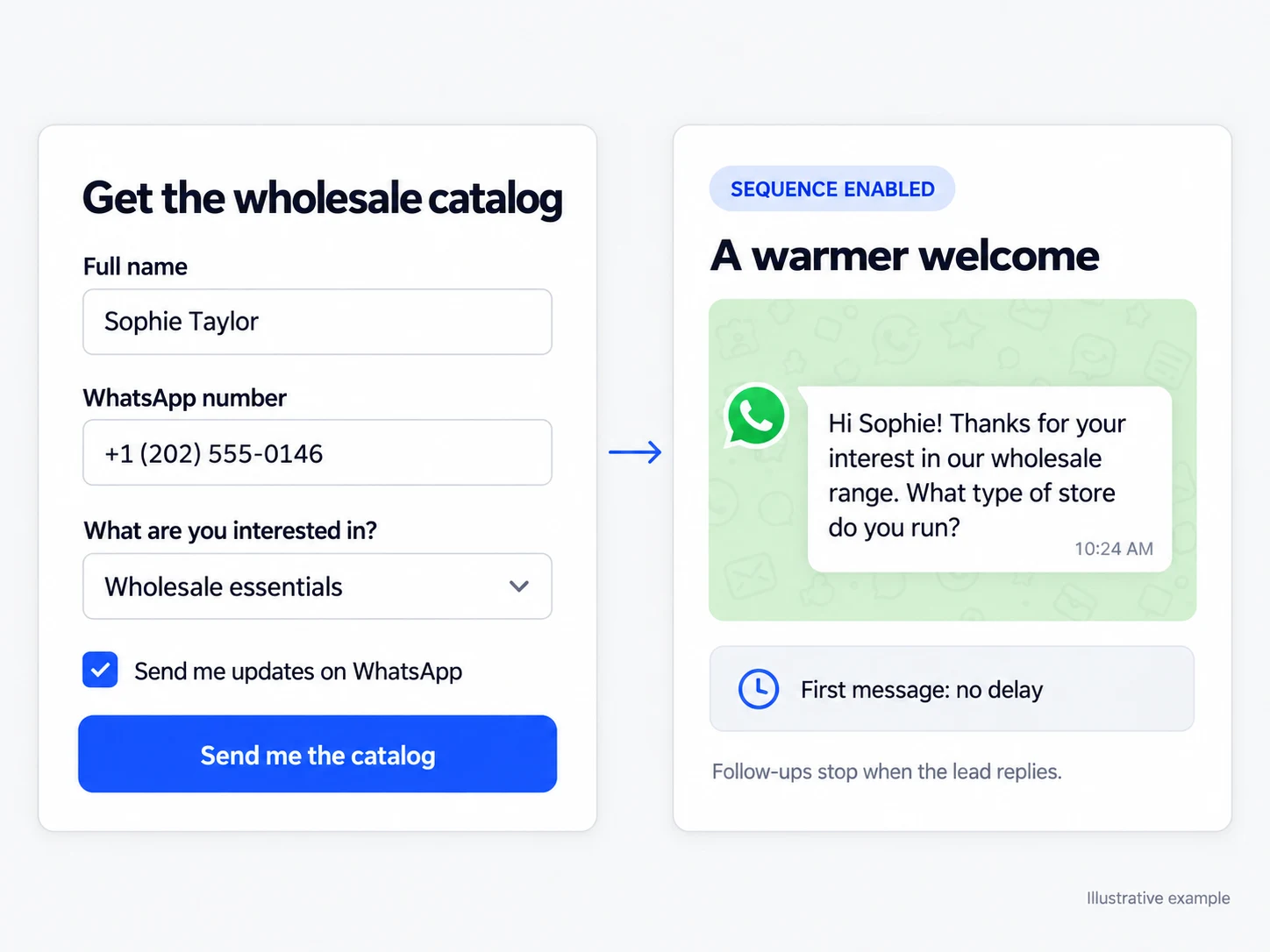
In addition to the required name and WhatsApp fields, add text, email, or selection fields to collect the context you need.
Customize the appearance and content, authorize publishing domains, and copy the installation snippet to your website.
Send the first message as soon as the form is submitted and add follow-ups if you want. A reply stops the remaining steps.
In addition to name and WhatsApp, the form can collect email, free text, and choices such as service, interest range, or buying stage. These answers are saved with the contact to guide the first approach. Publish inline or as a pop-up, restrict the permitted domains, and display consent text when applicable.
You can end the flow after capturing the lead or add a WhatsApp sequence. The first message is sent after the form submission, and the next messages follow the configured delays. Each step uses an approved template, counts as a paid notification, and stops being sent when the lead replies, preserving the conversation that has started.
Collect the desired service, timeframe, and interest range before the team starts helping.
Publish a form on the campaign page and organize the preferences declared by each contact.
Send a welcome message and optional follow-ups that stop as soon as the lead replies.
Choose the fields, copy, language, colors, and the message shown after submission.
Enter the authorized domains and, when applicable, the consent text visitors will see.
Paste the code into your website and view, review, or export the submissions you receive.
When you configure consent text, Infynia stores the displayed text and the date alongside the form response.
No. Capturing the contact and their answers is a complete workflow. The follow-up sequence is optional and can be added or removed without disabling lead capture.
The first message is sent when the form is submitted, and the next messages follow the configured delays. All of them use approved templates, and each send counts as a paid notification. A reply cancels the remaining steps.
More repeat purchase opportunities with a defined audience, an approved message, and visible results.
Explore solutionThe team can see who is handling each conversation, what has happened, and what comes next.
Explore solutionConnect every stage of your customer journey with WhatsApp, data, and artificial intelligence.